One library, every agent: syncing AI-agent skills across 15+ tools
Coding agents each store skills in their own folder, their own way. Skills Manager normalises all of them behind one central library — the architecture, and why it's a Rust filesystem program wearing a GUI.

Coding agents have converged on a good idea — skills: small, reusable units of capability you drop in a folder, and the agent picks them up. Claude Code reads ~/.claude/skills/. Cursor, Codex, Copilot, OpenCode and a dozen others each do their own version.
The problem is the folder. Every agent invented its own location and conventions. Write a useful skill and you copy it into Claude Code’s directory, then Cursor’s, then Codex’s. Update it, and you’re hand-editing five copies. They drift. There is no single source of truth.
Skills Manager (2,000+ stars) is the fix: one central library, a thin adapter per agent, and a sync engine. Edit a skill once; every agent sees the change.
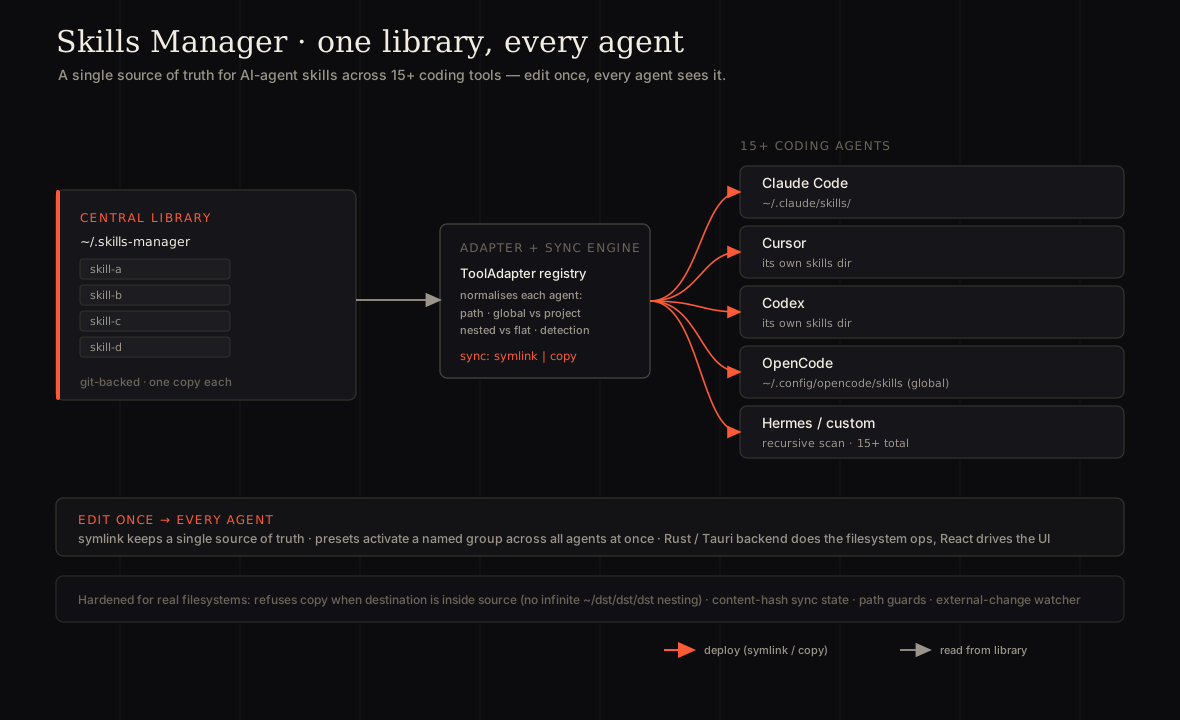
The adapter: one struct per agent
A central library only helps if something absorbs the variation between agents — and they vary in every dimension: where skills live (~/.claude/skills/ vs the XDG ~/.config/opencode/skills/), global vs project paths, flat vs nested layouts (some agents nest skills inside category folders), and how each one is detected. Every supported tool is a ToolAdapter — a small, declarative description of exactly those conventions:
pub struct ToolAdapter {
    pub key: String,
    pub display_name: String,
    pub relative_skills_dir: String,        // relative, e.g. .claude/skills
    pub relative_detect_dir: String,        // how we know it's installed
    pub additional_scan_dirs: Vec<String>,  // plugin / marketplace dirs
    pub recursive_scan: bool,               // nested category dirs (Hermes)
    pub project_relative_skills_dir: Option<String>, // global ≠ project path
    // ...
}
Adding a fifteenth agent is usually just a new row, not a new code path. Each adapter’s relative dir is expanded into candidate paths — home, plus an XDG .config fallback — and resolution picks whichever one actually exists on this machine:
fn select_existing_or_default(paths: &[PathBuf]) -> PathBuf {
    paths.iter().find(|p| p.exists()).cloned()
        .unwrap_or_else(|| paths[0].clone())
}
The “15+ tools” aren’t 15 integrations. They’re 15 rows in a registry over one normalised model. That’s the whole design bet — and it’s why supporting a new agent is a data change, not an engineering project.
The sync engine: symlink by default
Once a skill and a target agent are normalised, deploying is one operation with two modes:
pub enum SyncMode { Symlink, Copy }The default is symlink. The skill lives once in the central library; each agent’s directory holds a link to it. Edit the skill and every agent is updated at once — there are no copies to drift. Copy exists for environments where symlinks aren’t available.
The edge cases are where the real work hides. One example, straight from the source — a recursive copy that, left unguarded, eats its own output:
/// Refuse to copy when `dst` would land inside `src` — otherwise the recursive
/// copy walks into the freshly-created `dst`: <dst>/<dst>/<dst>/... forever. (#61)
fn ensure_dst_not_inside_src(src: &Path, dst: &Path) -> Result<()> { /* ... */ }
The kind of bug you only find by shipping to real machines.
The model: library, presets, workspaces
The sync engine is the how. The design is the what, and it rests on a deliberate split between the skills you have and where they’re deployed.
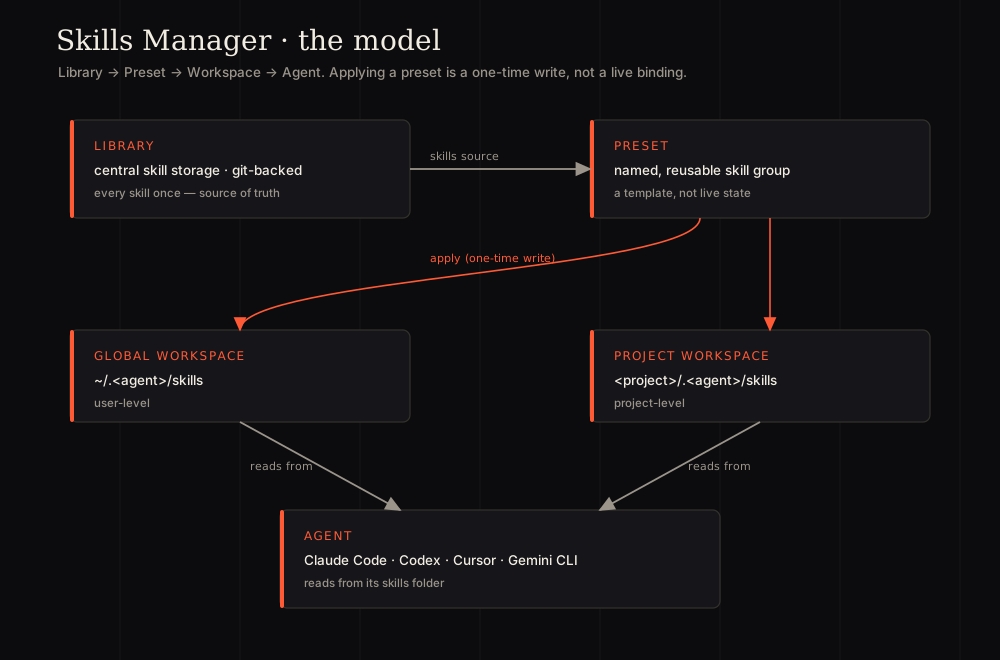
- Library — the central store. Every skill exists once, git-backed: the source of truth.
- Preset — a named, reusable group of skills, like “my Python stack” or “my code-review kit.” A preset is a template, not live state.
- Workspaces — the deployment surfaces. A Global Workspace manages an agent’s user-level skills (
~/.claude/skills/); a Project Workspace manages skills scoped to a single repo (<project>/.claude/skills/). The same preset can be stamped into either. - Agent — simply reads whatever sits in its skills folder.
The decision that makes presets work: applying one is a one-time action, not a live binding. Activate “my Python stack” on Claude Code and its current skills are deployed into the agent’s folder (each via the usual symlink-or-copy sync); later changes to the preset’s membership don’t reach back and rewrite what that agent already has. The preset is a curation label, not a subscription — which is the opposite of how an individual synced skill behaves. A synced skill is one source of truth you want tracked everywhere; a preset is a snapshot you compose once and stamp anywhere. Real workflows need both, so the tool ships both.
That separation is what lets it scale past “a folder of skills”: you assemble a capability set once and apply it across every agent and project with a click, instead of re-picking skills each time.
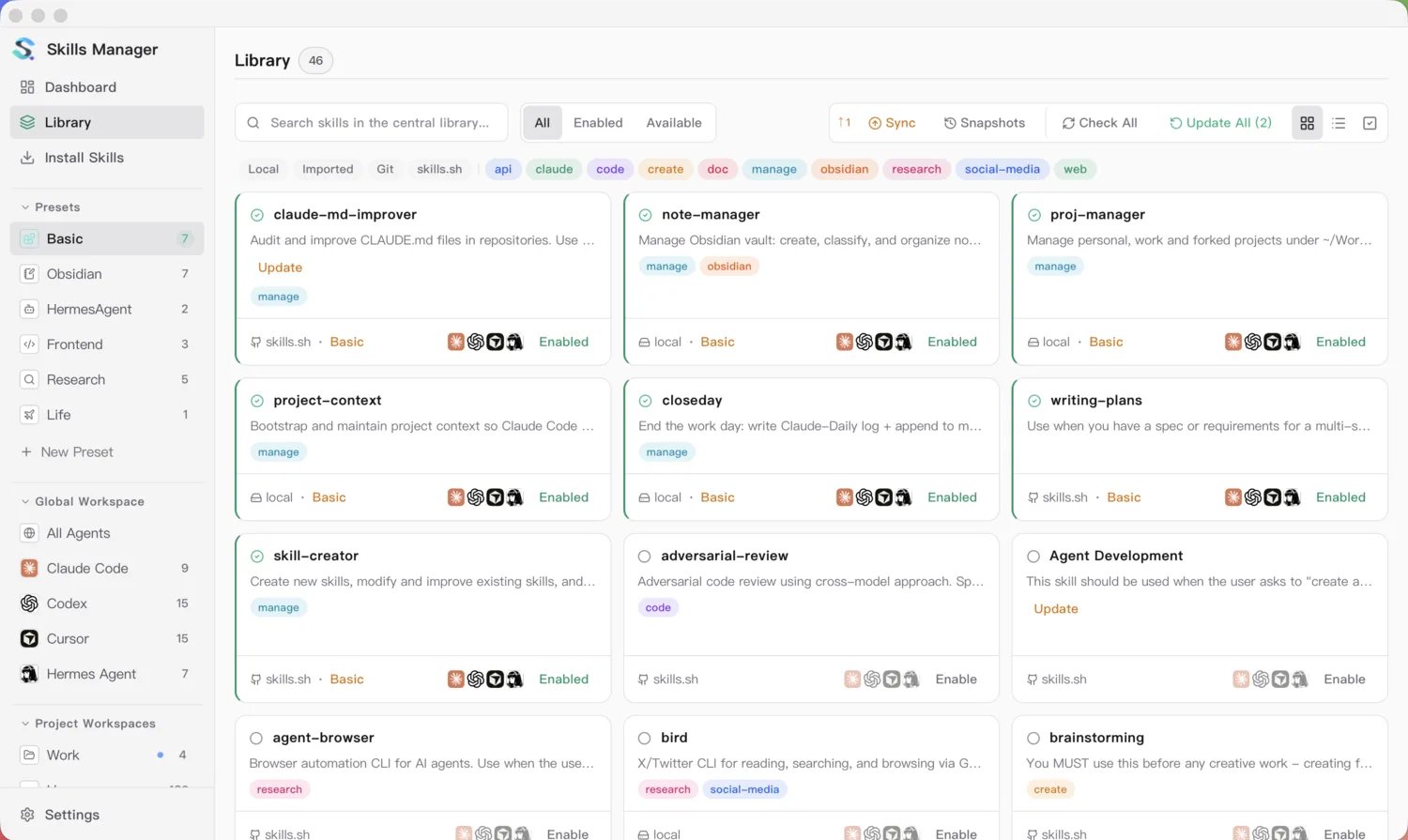
The model, made concrete: the central library on the right, with Presets and per-agent Workspaces down the left.
Why Rust + Tauri
This is a filesystem program wearing a GUI. Symlinks (with a Windows fallback), recursive copies, git backup, content-hash freshness checks, watching directories for outside changes, and a per-deployment record of target path, actual mode, status and source hash so the UI shows what each agent really has — that is the job. So the backend is Rust (via Tauri), doing the filesystem work with real error handling; React just drives the interface. The UI is the easy part; the value is the engine underneath.
Takeaways
- Normalise, don’t integrate. When you support N similar-but-different systems, find the one model that captures the variation and make each system a row, not a branch. A new agent is new data, not new code.
- Separate the catalogue from the deployment. The library is what you have; presets and workspaces are where it goes. Keeping them apart is what lets the tool scale past a folder of skills.
- Pick the binding per job. A symlinked skill is one source of truth you want tracked everywhere; a preset is a one-time stamp you compose once and apply anywhere. Ship both.
Skills Manager is open source — 2,000+ stars and counting.